1. What is ANSYS software?
ANSYS is a comprehensive software that covers almost all fields of physics, helping to intervene in the world of virtual modeling and engineering analysis for the design stages. Most investors love this technical analysis software for what it does and how much it costs them.
This powerful analysis software takes the engineering design process to a new level, not only working with environments, variable parameters, and multi-level functions, but also supporting working adaptively with new engineering models, but feature-rich CAE tools. Of course, Ansys will help improve design efficiency, enhance creativity, reduce physical constraints and limitations, and perform simulation tests that cannot be performed on other software.
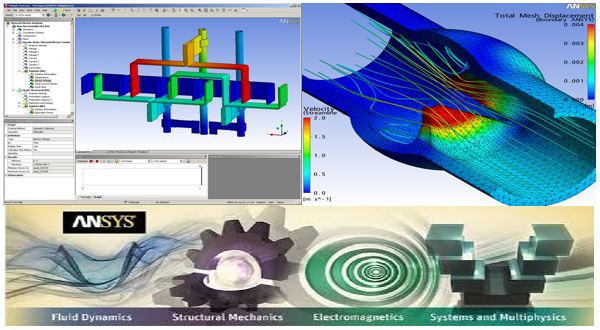
Ansys develops and markets finite element analysis software used to simulate engineering problems. This software creates computer models of structures, electronics, or machine components to simulate stress, toughness, elasticity, temperature distribution, electromagnetics, fluid flow, and other attributes. Ansys is used to simulate how a product performs with different specifications, without the need to prototype products or conduct crash tests. For example, Ansys software can simulate what a bridge will look like after many years of use, how to best handle salmon in a barrel to avoid waste, or how to design a skateboard that uses less material without losing safety.
Most simulations in Ansys are performed using Ansys Workbench software, which is one of the company’s main products. Typically, Ansys users break larger structures into small components that are simulated and tested individually. Users can start by defining the object’s dimensions, and then add weight, pressure, temperature, and other physical properties. Finally, Ansys software simulates and analyzes motion, fatigue, failure criteria, fluid flow, temperature distribution, electromagnetic efficiency, and other effects over time.
Ansys also develops software for data management and backup, research, and academic teaching. This software is sold on an annual subscription basis.
2.1/ History of ANSYS software development
Phase 1: The first commercial version of Ansys software was labeled version 2.0 and released in 1971. At that time, the software was made up of punched card boxes and the program often ran overnight for results the next morning. In 1975, non-linear and thermoelectric features were added. This software was used exclusively on mainframes, until version 3.0 (second release) was introduced for VAXstation in 1979. Version 3 had a DOS-like command line interface.
Phase 2: In 1980, the Apple II was released, allowing Ansys to transition to a graphical user interface in version 4 later that year. Version 4 of the Ansys software is easier to use and adds additional features for electromagnetic simulation. In 1989, Ansys began working with Compuflo. Compuflo’s Flotran fluid dynamics software was integrated into Ansys under version 5, released in 1993. Performance improvements in version 5.1 shortened processing times by two to four times, and were followed by followed by a series of performance improvements to keep pace with advances in computing. Ansys also began integrating its software with CAD software, such as Autodesk.
Phase 3: In 1996, Ansys released DesignSpace structural analysis software, the LS-DYNA fall and release testing simulation product, and the Ansys fluid dynamics (CFD) simulator. Ansys also adds parallel processing support for PCs with multiple processors. The Ansys/ed educational product was introduced in 1998. Version 6.0 of the main Ansys product was released in December 2001. Version 6.0 made realistic large-scale modeling possible for the first time, but Many users were disappointed by the new blue UI. The interface was reworked a few months later in 6.1. Version 8.0 introduced the Ansys multidisciplinary solver, allowing users to simulate how many physics problems will interact with each other.
Phase 4: Version 8.0 was published in 2005 and introduced Ansys’ fluid-structure interaction software, which simulates the interaction between structures and fluids. Ansys also releases authentic design software products and DesignXplorer, both of which deal with probability and randomness of physical factors. In 2009, version 12 was released with the second version of Workbench. Ansys also began to increasingly consolidate features into its Workbench software.
Phase 5: Version 15 of Ansys was released in 2014. It added mowis functionality for composites, bolt connections, and better meshing.
Phase 6: In February 2015, version 16 introduced the physical company AIM and Electronics Desktop. In 2016, version 17 introduced a new and improved user interface for computational fluid dynamics simulation. In January 2017, Ansys released version 18. Version 18 allows users to collect real-world data from products and then incorporate that data into future simulations. Ansys Application Builder, which allows engineers to build, use, and sell custom engineering tools, was also introduced with version 18.
Ansys is a quite popular CAE software today, used a lot by students and workers in study and research. It is a finite element analysis software completely used to simulate and calculate design. industrial design.
2.2/ Modules on the software
2.2.1/ Ansys Design Modeler và Ansys Meshing
Ansys Design Modeler and Ansys Meshing are two introductory modules when we start to approach Ansys. These are two important modules that help us draw models and divide meshes right in ANSYS, serving the process of model calculation. simulation later. This course helps students understand the concept of modeling as well as take advantage of ANSYS’s “near-realistic” simulation capabilities, helping students gain proficient skills when drawing models. as well as meshing in ANSYS.
2.2.2/ ANSYS Mechanical Workbench
ANSYS Mechanical Workbench (WB) is a common platform environment, that integrates many processing modules related to the fields of structures, thermodynamics, collisions, fluids… WB is increasingly developing. , aiming for a user-friendly interface. By linking problem types through simple drag-and-drop operations but still achieving high efficiency, WB is increasingly trusted by customers. In addition, WB is also Highly interoperable with CAD software, allowing users to bring complex models into WB for calculation, aiming for the goal of “Simulation is at the forefront of creating the foundation for product development”
2.2.3/ ANSYS MECHANICAL APDL
ANSYS MECHANICAL APDL (ANSYS Multiphysics) is a multi-field, multi-physics simulation module. This module helps us solve problems related to structure, heat, electricity – magnetism, explosion, collision, and new materials. ,..thanks to its very strong analysis capabilities. In addition, ANSYS Mechanical APDL integrates many material models and element types based on current famous theories. ANSYS Mechanical APDL brings us A fairly comprehensive simulation analysis chain, giving users a very comfortable and convenient simulation space.
2.3/ Applicability of ANSYS software in engineering
Fluids: Calculate the dynamics of fluids
Computational Dynamics (CFD) is a tool with great flexibility, accuracy, and breadth of application. However, real CFD, which provides insights that help you optimize your designs, may be out of your reach unless you choose your software carefully. To get accurate CFD results, you need to study it seriously. ANSYS CFD goes beyond qualitative results to provide accurate quantitative predictions of fluid interactions and interactions. These insights reveal unexpected opportunities for your product—opportunities that even technical analysts may miss.
 Structures: Structure, durability

ANSYS structural analysis software enables you to solve complex structural engineering problems and make better and faster design decisions. With the finite element analysis (FEA) tools available in the suite, you can customize and automate solutions to your structural mechanics problems and parameterize them for analysis. Accumulate many design situations. You can easily connect with other physics analysis tools for more realism. ANSYS structural analysis software is used throughout the industry to enable engineers to optimize their product designs and reduce the cost of physical testing.

Electronics: Electricity, magnetism
ANSYS electromagnetic field simulation helps you design innovative electrical and electronic products faster and more cost-effectively. In today’s world of high-performance electronics and advanced electromechanical systems, the effects of electromagnetic fields on circuits and systems cannot be ignored. ANSYS software can uniquely simulate electromagnetic performance across components, circuits, and system designs and can evaluate temperature, vibration, and other key mechanical effects. This asynchronous electromagnetic design family helps you achieve advanced system design success for advanced communications systems, high-speed electronics, electromechanical components, and avionics systems.

Semiconductors: Semiconductor technology
- Semiconductors: Growing demand for smart electronics is driving the integration and miniaturization of integrated circuit (IC) technology. Physical interactions arise from geometry miniaturization, especially FinFETs, stacked structures, and 3D-IC structures, leading to power unit integration and related reliability design challenges. By simulating electromigration, thermal effects, and discharge phenomena, you can verify the electrical noise integrity and reliability of the most complex ICs. ANSYS modeling and simulation tools give you early budget allocation analysis for high-impact design decisions and the manufacturer-certified accuracy needed for sign-off IC. Integrity and reliability of the IC system
- IC system integrity and reliability: The most important part of every electronic system is the chip that must meet many difficult requirements, such as high performance, increased functionality, power efficiency, reliability, and low cost. Ensuring chips meet integrity and reliability requirements both as stand-alone devices and in electronic systems requires a system chip design approach. ANSYS provides a suite of multiphysics solutions to support chip system (CPS) design flow.
- Company-certified accuracy: With the cost of designing and implementing a system on chip (SoC) ranging from $50 million to $200 million, first-time working silicon is essential. IC designers demand the most accurate simulation solutions and look to foundry certification as the ultimate proof of accuracy. ANSYS semiconductor solutions have been certified at all leading foundries since 2006.

Systems: Systems
- System Simulation: As product complexity increases, so does the challenge of integrating individual components within a system to ensure they function as expected. System modeling and simulation helps you create a complete virtual prototype to understand and optimize the critical interactions between physics, controls, and the environment throughout the product development process. Then, by combining system modeling with sensors and big data, you can develop a digital twin of the product to manage its performance and maintenance once it has been installed. deployment.
- 3-D physics, embedded software, and system simulation: ANSYS for systems solutions enables you to build complete, digital prototype systems. We provide the most advanced technologies for 3-D physical simulation, embedded systems, and software design. You can assemble different components into complete templates of multi-part software control systems, which can be used throughout the entire product lifecycle, from initial concept to product operation.

Embedded Software: Embedded software
Embedded software is increasingly being used in smart devices, but imperfect code can be the cause of many product failures. Industry leaders estimate that every 1,000 lines of embedded software contain eight bugs. To manage quality risks, as well as meet higher software certification standards, you need to leverage embedded software development tools and certified code exporters.ANSYS provides the simulation-based software development model and simulation environment with a pre-built source code set to accelerate embedded software development projects. Systems and software engineers use ANSYS SCADE solutions to graphically design, test, and automate the creation of mission-critical software systems and applications with high-reliability requirements. SCADE solutions are highly interoperable and can be easily integrated, allowing for optimized development and enhanced communication between team members.

Multiphysics: Multilateral
We live in a world that is subject to many physical impacts, and manufactured products are often subjected to multiple physical impacts at the same time. Fluid forces, thermal effects, textures, and electromagnetic radiation can affect product performance and handling in practice. If you try to isolate many forces in the environment, you will not be able to accurately predict behavior. ANSYS multicore solutions can help engineers test these effects in combination and isolation, achieving the ultimate solution when needed.
Proven, in-depth analysis technology from ANSYS is a built-in tool. Applying this technology to multi-environment simulation is the next step for the next technology phase.

Platform: Platform part
Platform_ ANSYS Workbench is the core for providing a comprehensive and integrated simulation system to customers. Use Workbench to simulate product development to deliver higher performance from integrated applications that use common and interoperable data models. Workbench gives you access to versatile systems and systems that were previously unattainable. IT organizations realize higher reliability, lower support costs, and reduced total cost of ownership because our platform solves hardware, software, and data problems encountered during the use of Many independent applications.